The genuine vds.exe file is a software component of Microsoft Windows Operating System by Microsoft Corporation. Microsoft's Virtual Disk Service (vds.exe) provided Windows Vista and 7, and the corresponding Windows Server versions, with a Component Object Model (COM) interface through which applications could interact with either normal Windows disk logic or Virtual Disk capabilities that make the physical storage configuration, including even external third-party RAID storage cabinets, transparent to the logical operations of the application. Virtual Disks are closely associated with the use of virtual machines where a Windows computer hosts one or more additional and/or different operating system(s) than its own. The service itself (vds.exe) could start automatically, with or without a delay after bootup, or be set to start manually when actually called by an application, using the registry. It could also be disabled. Beginning with Windows 8 and Server 2003, a different virtual storage implementation integrated with Windows Management Instrumentation (WMI) was introduced, the Windows Storage Management API, which supersedes VDS.
VDS stands for Virtual Disk Service
The .exe extension on a filename indicates an executable file. Executable files may, in some cases, harm your computer. Therefore, please read below to decide for yourself whether the vds.exe on your computer is a Trojan that you should remove, or whether it is a file belonging to the Windows operating system or to a trusted application.
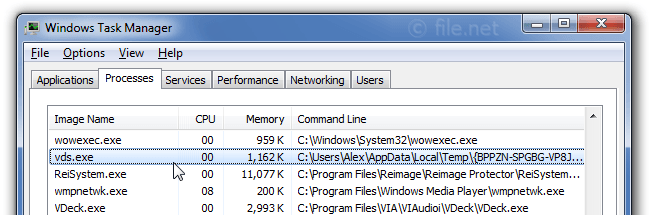
Description: Vds.exe is not essential for the Windows OS and causes relatively few problems. The file vds.exe is located in a subfolder of Windows folder for temporary files (mostly C:\Users\USERNAME\AppData\Local\Temp\{BPPZN-SPGBG-VP8JV-WW1YW-VG4ZS-G6KCO}\1\).
Known file sizes on Windows 10/11/7 are 1,350,656 bytes (66% of all occurrences) or 3,026,432 bytes.
The program has no file description. The vds.exe file is not a Windows system file. The program uses ports to connect to or from a LAN or the Internet. The program is not visible.
Therefore the technical security rating is 95% dangerous, however you should also read the user reviews.
If vds.exe is located in the C:\Windows\System32 folder, the security rating is 1% dangerous. The file size is 453,632 bytes.
Vds.exe is a Windows system file. The program is not visible. The file is a Microsoft signed file.
If vds.exe is located in a subfolder of the user's profile folder, the security rating is 82% dangerous. The file size is 101,888 bytes (33% of all occurrences), 3,026,432 bytes or 2,242,560 bytes.
Vds.exe is a file with no information about its developer. The program has no visible window. Vds.exe is not a Windows system file. The application is loaded during the Windows boot process (see Registry key: User Shell Folders, RunOnce, Run, DEFAULT\Runonce, DEFAULT\Run).
Vds.exe is able to monitor applications and record keyboard and mouse inputs.
If vds.exe is located in a subfolder of "C:\Program Files", the security rating is 100% dangerous. The file size is 320,000 bytes.
Important: Some malware also uses the file name vds.exe, for example HEUR:Trojan.Win32.Generic or not-a-virus:RiskTool.Win64.BitCoinMiner.azr (detected by Kaspersky), and Trojan.Gen or Trojan.Gen.2 (detected by Symantec). Therefore, you should check the vds.exe process on your PC to see if it is a threat. We recommend Security Task Manager for verifying your computer's security. This was one of the Top Download Picks of The Washington Post and PC World.
Score
User Comments
vds.exe is a process from Virtual Disk Service by Microsoft Corporation and part of Microsoft Windows Operating System. Jake
Microsoft Virtual Disk Service vds.exe is a necessary process that, among other things, formats a hard drive. Jarrod
vds is an ancient way to watch movie or videos at home. it was later replaced by DVD Dr. Polmerius F. Ostragan
nessessary process, especially when using diskpart from cmd.exe joe
It's a Virus if the location is from the TEMP folder. Michael -Senior NetSec Advisor
Lastet die Grafikkarte voll aus, wenn der PC nach mehr als 10 Minuten nicht genutzt wird. NeariX
It was using my Nvidia GPU for no reason, be careful. I found the app (exe) through the process in a Temp folder, killed it, and GPU usage dropped afterwards. Ahmed
Ce processus est nécessaire et sain s'il se trouve dans le dossier System32 https://www.virustotal.com/fr/file/09727093c5f7b258867c16d41f7f9835bf549cc339288bfe01a8f34ac7e93e23/analysis/1520772384/ S'il se trouve ailleurs, vous devriez faire analyser votre fichier sur le site virus total car il y a de fortes chances qu'il s'agisse d'une infection. Kokotsan (further information)
Summary: Average user rating of vds.exe:
based on 10 votes with 8 user comments.
6 users think vds.exe is essential for Windows or an installed application.
One user thinks it's probably harmless.
One user thinks it's neither essential nor dangerous.
One user suspects danger.
One user thinks vds.exe is dangerous and recommends removing it.
Best practices for resolving vds issues
A clean and tidy computer is the key requirement for avoiding problems with vds. This means running a scan for malware, cleaning your hard drive using 1cleanmgr and 2sfc /scannow, 3uninstalling programs that you no longer need, checking for Autostart programs (using 4msconfig) and enabling Windows' 5Automatic Update. Always remember to perform periodic backups, or at least to set restore points.
Should you experience an actual problem, try to recall the last thing you did, or the last thing you installed before the problem appeared for the first time. Use the 6resmon command to identify the processes that are causing your problem. Even for serious problems, rather than reinstalling Windows, you are better off repairing of your installation or executing the 7DISM.exe /Online /Cleanup-image /Restorehealth command. This allows you to repair the operating system without losing data.
To get your computer running as fast as it did on day one, you can 8reset your PC. Your personal files will remain intact, but any programs you installed will need to be reinstalled.
To help you analyze the vds.exe process on your computer, the following programs have proven to be helpful: ASecurity Task Manager displays all running Windows tasks, including embedded hidden processes, such as keyboard and browser monitoring or Autostart entries. A unique security risk rating indicates the likelihood of the process being potential spyware, malware or a Trojan. A good Bantivirus software detects and removes sleeping spyware, adware, Trojans, keyloggers, malware and trackers from your hard drive.

Score
User Comments
Jake
Jarrod
Dr. Polmerius F. Ostragan
joe
Michael -Senior NetSec Advisor
NeariX
Ahmed
Kokotsan (further information)
Summary: Average user rating of vds.exe: based on 10 votes with 8 user comments. 6 users think vds.exe is essential for Windows or an installed application. One user thinks it's probably harmless. One user thinks it's neither essential nor dangerous. One user suspects danger. One user thinks vds.exe is dangerous and recommends removing it.