The genuine awesomium_process.exe file is a software component of Awesomium by Awesomium. Awesomium_process.exe is an executable file that is associated with Awesomium, a web-browser built on the Webkit platform that is used to display HTML interfaces and web-content within C++ or .NET applications. This is not an essential process for Windows and can be disabled if known to create problems.
Awesomium is a free web-browser toolkit that can be integrated within applications built using C++ or Microsoft's .NET framework. Awesomium supports and displays HTML content. The application is heavily used in games such as Guild Wars 2 and Lord of the Rings Online.
awesomium_process stands for AwesomiumProcess WebBrowser
The .exe extension on a filename indicates an executable file. Executable files may in some cases harm your computer. Therefore, please read below to decide for yourself whether the awesomium_process.exe on your computer is a Trojan that you should remove, or whether it is a file belonging to the Windows operating system or to a trusted application.
Since 2005, file.net has helped users better understand and correctly identify Windows processes. Our own analysis, research, and the collective experience of our community provide reliable, easy-to-understand information. Around 10,000 users trust us every day.
Awesomium_process.exe file information
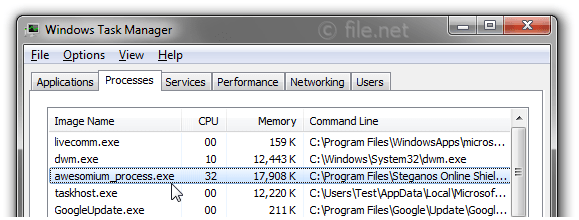
Awesomium_process.exe process in Windows Task Manager
Description: Awesomium_process.exe is not essential for Windows and will often cause problems. Awesomium_process.exe is located in a subfolder of "C:\Program Files (x86)" or sometimes in a subfolder of C:\—typically C:\Program Files (x86)\Steganos Online Shield\.
Known file sizes on Windows 10/11/7 are 40,416 bytes (36% of all occurrences), 42,568 bytes and 4 more variants.
The program is not visible. The file is not a Windows system file. It is certified by a trustworthy company.
Therefore the technical security rating is 38% dangerous, however you should also read the user reviews.
Uninstalling this variant:
You might want to do the following:
go to the software publisher, www.steganos.com, [1][2] for advice
uninstall Steganos Online Shield or Steam from your computer using the Control Panel applet Uninstall a Program
If awesomium_process.exe is located in a subfolder of Windows folder for temporary files, the security rating is 46% dangerous. The file size is 37,440 bytes.
The file has a digital signature. There is no file information. Awesomium_process.exe is not a Windows core file. The program is not visible.
If awesomium_process.exe is located in a subfolder of the user's profile folder, the security rating is 56% dangerous. The file size is 32,256 bytes.
The process has no file description. The file is not a Windows core file. The program has no visible window.
Important: Some malware camouflages itself as awesomium_process.exe, particularly when located in the C:\Windows or C:\Windows\System32 folder. Therefore, you should check the awesomium_process.exe process on your PC to see if it is a threat. We recommend Security Task Manager for verifying your computer's security. This was one of the Top Download Picks of The Washington Post and PC World.
Score
User Comments
it was apparently installed in 02/2014. since then my computer keeps intermittently losing and regaining internet access. happens too often to be a problem with the server, I feel. MacAfee did not list it as spyware. marymullins
This product is also used by Disconnect's "Private Search" application. It was located at: "C:\Users\xxx\AppData\Roaming\Disconnect\Disconnect Private Search". Yusuf F. (further information)
Seems to be bundled with another process called "BrowserControler" JSullivan
This is a file in a steam game called Garry's Mod. I do not know much about it myself except that, as stated above, it is used in several different games. mix12
Attached with MMORPG Game like Guild Ward 2, Tera, Skyforge or other, Awesomium_process.exe is a small webbrowser based on chrome, used by games in many posts screens (store, community, account, etc). Disable this process and games post screens not run properly. deefaze
It came with Flickr official uploader. It seems not to be needed by the main program. manooon
This file is installed with Everquest II and is used for the in-game web browser. It quite often uses an extreme amount of resources and slows the computer down. I routinely delete it after any game updates since I have no use for the in-game browser. Herbert
Secret World Update Download. AV.Detected i cannot use some of game functions like use items and just cannot pick items to make it work. GodTech
comes with PDG PROmote, airforce promotion studying software. seems harmless in this case. taco234
This is ussaly used in some games/apps, such as GMod.
Summary: Average user rating of awesomium_process.exe:
based on 15 votes with 11 user comments.
5 users think awesomium_process.exe is essential for Windows or an installed application.
3 users think it's probably harmless.
3 users think it's neither essential nor dangerous.
One user suspects danger.
3 users think awesomium_process.exe is dangerous and recommend removing it.
2 users don't grade awesomium_process.exe ("not sure about it").
Best practices for resolving awesomium_process issues
A clean and tidy computer is the key requirement for avoiding problems with awesomium_process. This means running a scan for malware, cleaning your hard drive using 1cleanmgr and 2sfc /scannow, 3uninstalling programs that you no longer need, checking for Autostart programs (using 4msconfig) and enabling Windows' 5Automatic Update. Always remember to perform periodic backups, or at least to set restore points.
Should you experience an actual problem, try to recall the last thing you did, or the last thing you installed before the problem appeared for the first time. Use the 6resmon command to identify the processes that are causing your problem. Even for serious problems, rather than reinstalling Windows, you are better off repairing of your installation or executing the 7DISM.exe /Online /Cleanup-image /Restorehealth command. This allows you to repair the operating system without losing data.
To get your computer running as fast as it did on day one, you can 8reset your PC. Your personal files will remain intact, but any programs you installed will need to be reinstalled.
To help you analyze the awesomium_process.exe process on your computer, the following programs have proven to be helpful: ASecurity Task Manager displays all running Windows tasks, including embedded hidden processes, such as keyboard and browser monitoring or Autostart entries. A unique security risk rating indicates the likelihood of the process being potential spyware, malware or a Trojan. A good Bantivirus software detects and removes sleeping spyware, adware, Trojans, keyloggers, malware and trackers from your hard drive.





Score
User Comments
marymullins
Yusuf F. (further information)
JSullivan
mix12
deefaze
manooon
Herbert
GodTech
taco234
Al (further information)
Summary: Average user rating of awesomium_process.exe: based on 15 votes with 11 user comments. 5 users think awesomium_process.exe is essential for Windows or an installed application. 3 users think it's probably harmless. 3 users think it's neither essential nor dangerous. One user suspects danger. 3 users think awesomium_process.exe is dangerous and recommend removing it. 2 users don't grade awesomium_process.exe ("not sure about it").