Esif_uf.exe file information
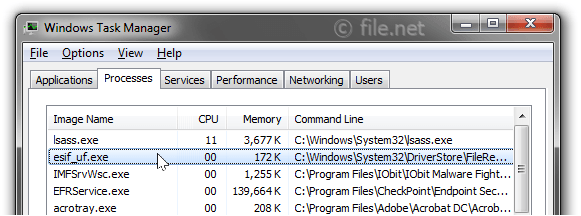
The process known as Intel® Dynamic Platform and Thermal Framework or Intel® Dynamic Tuning Service belongs to software Intel® Dynamic Platform and Thermal Framework or Intel® Dynamic Tuning or ESIF Upper Framework Service or Intel® Dynamic Platform and Thermal Framework service by Intel (www.intel.com).
Description: Esif_uf.exe is not essential for Windows and will often cause problems. Esif_uf.exe is located in a subfolder of C:\Windows\System32—mainly C:\Windows\System32\DriverStore\FileRepository\dptf_cpu.inf_amd64_4a3ae74cfa6c37d6\ or C:\Windows\System32\DriverStore\FileRepository\dptf_cpu.inf_amd64_7ecc5be6ca7b3b0d\.
Known file sizes on Windows 10/11/7 are 2,141,064 bytes (15% of all occurrences), 2,284,200 bytes and 13 more variants. 
The process is a service (esifsvc) running invisible in the background: Intel Dynamic Tuning service.
The file is certified by a trustworthy company. It is not a Windows system file. The program is not visible. It is a Microsoft signed file.
Therefore the technical security rating is 12% dangerous, but you should also take into account the user reviews.
Recommended: Identify esif_uf.exe related errors
- If esif_uf.exe is located in a subfolder of C:\Windows, the security rating is 14% dangerous. The file size is 1,392,792 bytes (30% of all occurrences), 1,037,568 bytes and 5 more variants. It is not a Windows core file. The program has no visible window. Esif_uf.exe is digitally signed. It is a trustworthy file from Microsoft.
- If esif_uf.exe is located in the C:\Windows\System32 folder, the security rating is 10% dangerous. The file size is 1,304,728 bytes (42% of all occurrences), 1,419,424 bytes, 1,392,792 bytes, 1,394,360 bytes or 1,037,568 bytes. The program has no visible window. The file is not a Windows system file. The file is a trustworthy file from Microsoft. It is digitally signed.
- If esif_uf.exe is located in a subfolder of C:\, the security rating is 36% dangerous. The file size is 1,551,360 bytes.
- If esif_uf.exe is located in a subfolder of "C:\Program Files", the security rating is 90% dangerous. The file size is 13,179,660 bytes.
Important: Some malware camouflages itself as esif_uf.exe, particularly when located in the C:\Windows or C:\Windows\System32 folder, for example ML.Attribute.HighConfidence (detected by Symantec), and Trojan-Spy.MSIL.Stealer.cwf or HEUR:Trojan.MSIL.Dnoper.gen (detected by Kaspersky). Therefore, you should check the esif_uf.exe process on your PC to see if it is a threat. We recommend Security Task Manager for verifying your computer's security. This was one of the Top Download Picks of The Washington Post and PC World.
Score
User Comments
GG
Gary Johnson
Joe
Hugo Simões
Summary: Average user rating of esif_uf.exe: based on 5 votes with 4 user comments. One user thinks it's probably harmless. 2 users think it's neither essential nor dangerous. One user suspects danger. One user thinks esif_uf.exe is dangerous and recommends removing it.