The genuine PSEXESVC.exe file is a software component of Sysinternals PsExec by Microsoft. Psexesvc.exe is an executable file that runs the Sysinternals PsExec utility, useful for remotely executing processes on other systems. This is not a critical Windows component and should be removed if known to cause problems. PsExec let users execute processes on remote systems without the need to have any kind of client software present on the remote computers. PsExec provides full interactivity for console applications. The program can be used to launch command-prompts and run tools such as IpConfig which otherwise don't have the ability to display information about the remote system. PsExec was first released on May 2, 2014. Sysinternals is a website launched in 1996 by Mark Russinovich and Bryce Cogswell to host their free yet advanced system utilities designed to administer and monitor computers running Microsoft Windows. In 2006, Microsoft acquired Sysinternals, as well as Winternals Software LP, the company that operated the Sysinternals website. Windows Sysinternals is currently part of the Microsoft TechNet website. Microsoft was founded in 1975 by Bill Gates and Paul Allen and quickly rose to prominence following the launch of their popular operating system, MS-DOS for early personal computers. After the company went public in 1986, its rising share prices created three billionaires and roughly 12,000 millionaires from Microsoft employees. Microsoft began developing graphical user interfaces and the distinguishable Start-button after the introduction of Windows 95. Further additions like networking and security soon followed. Microsoft is currently headquartered in Redmond, Washington, USA.
PsExeSvc stands for PsExec: Remote ProcessExecution Service
The .exe extension on a filename indicates an executable file. Executable files may, in some cases, harm your computer. Therefore, please read below to decide for yourself whether the PSEXESVC.exe on your computer is a Trojan that you should remove, or whether it is a file belonging to the Windows operating system or to a trusted application.
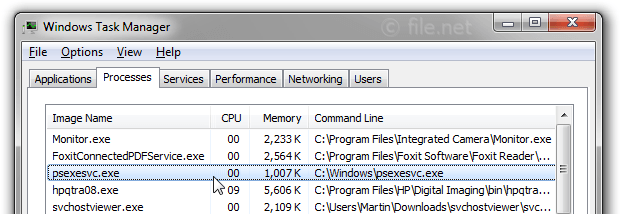
Description: PSEXESVC.exe is not essential for Windows and will often cause problems. PSEXESVC.exe is located in the C:\Windows folder.
Known file sizes on Windows 10/11/7 are 181,064 bytes (44% of all occurrences), 189,792 bytes, 145,568 bytes or 242,064 bytes.
The program is not visible. The file is not a Windows core file. The PSEXESVC.exe file is digitally signed. The file is a Verisign signed file.
Therefore the technical security rating is 14% dangerous; however you should also read the user reviews.
Uninstalling this variant:
If problems with PSEXESVC.exe occur, you may want to do the following: 1) remove the entire program psexesvc or psexec using Windows Control Panel 2) look for help on the www.sysinternals.com website.
Important: Some malware disguises itself as PSEXESVC.exe, particularly when not located in the C:\Windows folder. Therefore, you should check the PSEXESVC.exe process on your PC to see if it is a threat. We recommend Security Task Manager for verifying your computer's security. This was one of the Top Download Picks of The Washington Post and PC World.
Score
User Comments
Eine Datei die den PC Ausspioniert,bei Firmen als Eingesetzt Gerd...
psexesvc.exe is part of Sysinternals PsExec developed by Sysinternals. Garry
PSEXESVC.exe was used as the masked command for ransomware that hit the company network. August 2018 Mad Engine - San Diego
Disguised itself and was used to deploy ransomeware on a network - Sept 2019 Ryan
PSEXESVC.exe was used as the masked command for ransomware that hit the company network. Simon
It can be leveraged by malicious actors or malicious software. But it can also be used for administrative actions. It all depends on the context. f4d0
Summary: Average user rating of PSEXESVC.exe:
based on 7 votes with 6 user comments.
2 users think it's probably harmless.
One user thinks it's neither essential nor dangerous.
One user suspects danger.
3 users think PSEXESVC.exe is dangerous and recommend removing it.
Best practices for resolving PSEXESVC issues
A clean and tidy computer is the key requirement for avoiding problems with PSEXESVC. This means running a scan for malware, cleaning your hard drive using 1cleanmgr and 2sfc /scannow, 3uninstalling programs that you no longer need, checking for Autostart programs (using 4msconfig) and enabling Windows' 5Automatic Update. Always remember to perform periodic backups, or at least to set restore points.
Should you experience an actual problem, try to recall the last thing you did, or the last thing you installed before the problem appeared for the first time. Use the 6resmon command to identify the processes that are causing your problem. Even for serious problems, rather than reinstalling Windows, you are better off repairing of your installation or executing the 7DISM.exe /Online /Cleanup-image /Restorehealth command. This allows you to repair the operating system without losing data.
To get your computer running as fast as it did on day one, you can 8reset your PC. Your personal files will remain intact, but any programs you installed will need to be reinstalled.
To help you analyze the PSEXESVC.exe process on your computer, the following programs have proven to be helpful: ASecurity Task Manager displays all running Windows tasks, including embedded hidden processes, such as keyboard and browser monitoring or Autostart entries. A unique security risk rating indicates the likelihood of the process being potential spyware, malware or a Trojan. A good Bantivirus software detects and removes sleeping spyware, adware, Trojans, keyloggers, malware and trackers from your hard drive.

Score
User Comments
Gerd...
Garry
Mad Engine - San Diego
Ryan
Simon
f4d0
Summary: Average user rating of PSEXESVC.exe: based on 7 votes with 6 user comments. 2 users think it's probably harmless. One user thinks it's neither essential nor dangerous. One user suspects danger. 3 users think PSEXESVC.exe is dangerous and recommend removing it.