Deutsch

What is ReimageRepair.exe?

ReimageRepair.exe is an executable file associated with the software Reimage Repair. This software is developed by Reimage, a company known for its PC repair technology. The file is typically located in the Downloads folder of the user's computer (C:\Users\USERNAME\Downloads).

Reimage Repair is a system repair program that can diagnose and detect issues with your computer. It scans your PC to identify hardware, security, and stability issues and then repairs these problems without you needing to reinstall the operating system. It can fix Windows errors, repair damage caused by viruses, replace damaged or missing Windows files, and improve the performance of your PC.

Reimage Repair can be a useful tool if your computer is experiencing issues that you're unable to resolve manually. Some users have reported that Reimage Repair can sometimes behave like a potentially unwanted program (PUP). It may show up on your computer without your explicit consent, as it often comes bundled with other software. It may also display frequent pop-up messages urging you to purchase the full version of the software.

If you find that Reimage Repair is causing more problems than it's solving, or if you didn't intentionally download it, you may want to remove it. You can do this by uninstalling the software from your computer's Control Panel or by using a reputable anti-malware program.

Click to Run a Free Scan for ReimageRepair.exe related errors

Since 2005, file.net has researched facts about Windows processes and files, analyzed user experiences, and examined files using its own analysis tools. Around 10,000 users rely on it every day.


ReimageRepair.exe file information
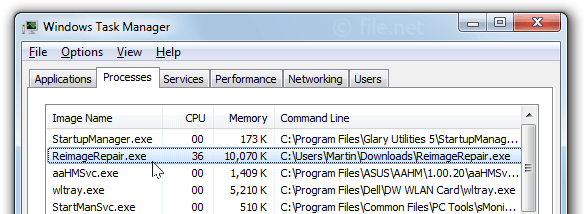
Windows Task Manager with ReimageRepair
ReimageRepair.exe process in Windows Task Manager

The process known as Reimage Downloader or Reimage Installer belongs to software Reimage Repair by .

Description: ReimageRepair.exe is not essential for the Windows OS and causes relatively few problems. The file ReimageRepair.exe is located in a subfolder of the user's profile folder or sometimes in a subfolder of C:\ (generally C:\Users\USERNAME\Downloads\). Known file sizes on Windows 10/11/7 are 605,424 bytes (42% of all occurrences), 595,120 bytes, 587,808 bytes or 604,928 bytes. file.net/process/reimagerepair.exe.html 
The program has a visible window. The ReimageRepair.exe file is not a Windows system file. The file is certified by a trustworthy company. The process uses ports to connect to or from a LAN or the Internet. The file is a Verisign signed file. ReimageRepair.exe is able to monitor applications and record keyboard and mouse inputs. Therefore the technical security rating is 52% dangerous; but you should also compare this rating with the user reviews.

Uninstalling this variant: If you have any problems with ReimageRepair.exe, you can do the following:
  1) uninstall Reimage Repair software via Windows Control Panel/Add or Remove Programs (Windows XP) or Programs and Features (Windows 10/8/7)
  2) turn to the software company, Reimageplus, for advice.

Recommended: Identify ReimageRepair.exe related errors

Important: Some malware camouflages itself as ReimageRepair.exe, particularly when located in the C:\Windows or C:\Windows\System32 folder. Therefore, you should check the ReimageRepair.exe process on your PC to see if it is a threat. We recommend Security Task Manager for verifying your computer's security. This was one of the Top Download Picks of The Washington Post and PC World.

Score

User Comments

Es bringt genau so wenig wie als Beispiel "Tune Up Utilities". Win 10 ist ein nicht mehr überschaubarer Monolith, der zig neue Systemordner dazu bekommen hat. Leider kann immer noch jedes Programm Windows infizieren. Bei Linux brauchen die Programme "Root" Rechte. Wenn sie wie z. B. Ubuntu und Co. aus offiziellen Quellen stammen, kann kein Virus ins System. Denn während der Installation haben diese Dateien "Root" Rechte und können ins System schreiben. Nach der Installation ist dem nicht so. Kein Virus weiß das Admin Passwort. Wie auch ? Aber ein paar Schlaue installieren aus dubiosen Quellen oder laden die *.deb Dateien runter, um sie dann z. B. mit debconfig zu installieren. Das kann gut gehen, wenn der Mensch vor dem PC weiss, dass die Datei sicher ist. ABER: Die Datenbank von Linux wird hier umgangen. Das ist Mist.
  Norbert Kaiser   (further information)
I have used it on two Android-computers and it's perfect. I am very content with it!
  Stig Walldin  
It could solve a problem with a missing MBR
  Ben ten Berge  

Summary: Average user rating of ReimageRepair.exe: based on 6 votes with 3 user comments. 2 users think ReimageRepair.exe is essential for Windows or an installed application. 3 users think it's probably harmless. One user thinks it's neither essential nor dangerous. One user is not sure about it.


Do you have additional information? Help other users!
:
:
:
:
 

Best practices for resolving ReimageRepair issues

A clean and tidy computer is the key requirement for avoiding problems with ReimageRepair. This means running a scan for malware, cleaning your hard drive using 1cleanmgr and 2sfc /scannow, 3uninstalling programs that you no longer need, checking for Autostart programs (using 4msconfig) and enabling Windows' 5Automatic Update. Always remember to perform periodic backups, or at least to set restore points.

Should you experience an actual problem, try to recall the last thing you did, or the last thing you installed before the problem appeared for the first time. Use the 6resmon command to identify the processes that are causing your problem. Even for serious problems, rather than reinstalling Windows, you are better off repairing of your installation or executing the 7DISM.exe /Online /Cleanup-image /Restorehealth command. This allows you to repair the operating system without losing data.

To get your computer running as fast as it did on day one, you can 8reset your PC. Your personal files will remain intact, but any programs you installed will need to be reinstalled.

To help you analyze the ReimageRepair.exe process on your computer, the following programs have proven to be helpful: ASecurity Task Manager displays all running Windows tasks, including embedded hidden processes, such as keyboard and browser monitoring or Autostart entries. A unique security risk rating indicates the likelihood of the process being potential spyware, malware or a Trojan. A good Bantivirus software detects and removes sleeping spyware, adware, Trojans, keyloggers, malware and trackers from your hard drive.


Other processes

ReimageRepair.exe [all]


Microsoft partner since 2011 safe verifiziert safe


