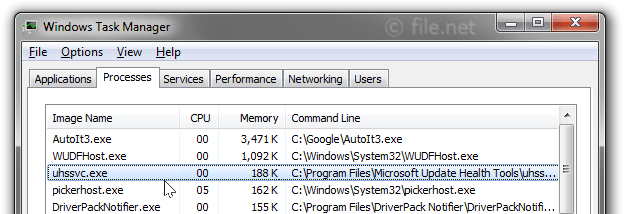
uhssvc.exe is an executable file that is part of the Microsoft Update Health Tools. This software is developed by Microsoft and is typically located in the C:\Program Files\Microsoft Update Health Tools directory.
Microsoft Update Health Tools is a software package designed to help keep your Windows operating system up-to-date and running smoothly. It checks for updates, installs them when necessary, and fixes any issues that may arise during the update process. This helps to ensure that your system is secure and running the latest features.
uhssvc.exe is needed as it is a core component of the Microsoft Update Health Tools. Without it, the software may not function correctly, potentially leaving your system vulnerable to security risks or missing out on important updates.
There is no need to remove uhssvc.exe as it is a legitimate part of the Windows operating system. If it is causing problems or if you suspect it may be a virus or malware disguised as the legitimate file, then it may be necessary to remove it. Always ensure to use a reliable antivirus software to scan and remove any potential threats.
Since 2005, file.net has helped users better understand and correctly identify Windows processes. Our own analysis, research, and the collective experience of our community provide reliable, easy-to-understand information. Around 10,000 users trust us every day.
Description: Uhssvc.exe is not essential for the Windows OS and causes relatively few problems. Uhssvc.exe is located in a subfolder of "C:\Program Files"—e.g. C:\Program Files\Microsoft Update Health Tools\.
Known file sizes on Windows 11/10/7 are 346,448 bytes (17% of all occurrences), 370,560 bytes and 22 more variants.
The process runs as service uhssvc in the background. The service maintains Update Health.
The program is not visible. The file is not a Windows system file. The file has a digital signature.
Therefore the technical security rating is 19% dangerous.
Important: Some malware camouflages itself as uhssvc.exe, particularly when located in the C:\Windows or C:\Windows\System32 folder. Therefore, you should check the uhssvc.exe process on your PC to see if it is a threat. We recommend Security Task Manager for verifying your computer's security. This was one of the Top Download Picks of The Washington Post and PC World.
Score
User Comments
One user thinks it's probably harmless.
Best practices for resolving uhssvc issues
A clean and tidy computer is the key requirement for avoiding problems with uhssvc. This means running a scan for malware, cleaning your hard drive using 1cleanmgr and 2sfc /scannow, 3uninstalling programs that you no longer need, checking for Autostart programs (using 4msconfig) and enabling Windows' 5Automatic Update. Always remember to perform periodic backups, or at least to set restore points.
Should you experience an actual problem, try to recall the last thing you did, or the last thing you installed before the problem appeared for the first time. Use the 6resmon command to identify the processes that are causing your problem. Even for serious problems, rather than reinstalling Windows, you are better off repairing of your installation or executing the 7DISM.exe /Online /Cleanup-image /Restorehealth command. This allows you to repair the operating system without losing data.
To get your computer running as fast as it did on day one, you can 8reset your PC. Your personal files will remain intact, but any programs you installed will need to be reinstalled.
To help you analyze the uhssvc.exe process on your computer, the following programs have proven to be helpful: ASecurity Task Manager displays all running Windows tasks, including embedded hidden processes, such as keyboard and browser monitoring or Autostart entries. A unique security risk rating indicates the likelihood of the process being potential spyware, malware or a Trojan. A good Bantivirus software detects and removes sleeping spyware, adware, Trojans, keyloggers, malware and trackers from your hard drive.





Score
User Comments
One user thinks it's probably harmless.