The genuine mstsc.exe file is a software component of Microsoft Windows Operating System by Microsoft Corporation. Microsoft kept the name "mstsc.exe" for the "Terminal Services Client" process when they renamed its function as "Remote Desktop Connection" and Terminal Services became Remote Desktop Protocol (RDP). Terminal Services was at first a separate "Windows NT Server 4.0 Terminal Server" edition but in Win2000 it became part of all Windows NT client and server versions. (The name "RDP" was introduced for Server 2008 R2.) "Mstsc.exe" should occupy about 1 MB in "C:\Windows\System32" and should not be removed. If found in "C:\Windows", it is most likely malware. It can only connect to a Windows system having RDP, which becomes the "RDP server". RDP creates a "thin client" connection where the remote client user logs into the "RDP server" and views its desktop and runs its applications, including their UIs, as if they were local. It also enables a local computer to use Fast User Switching and Windows Remote Assistance.
MsTSC stands for Microsoft Terminal Services Client
The .exe extension on a filename indicates an executable file. Executable files may, in some cases, harm your computer. Therefore, please read below to decide for yourself whether the mstsc.exe on your computer is a Trojan that you should remove, or whether it is a file belonging to the Windows operating system or to a trusted application.
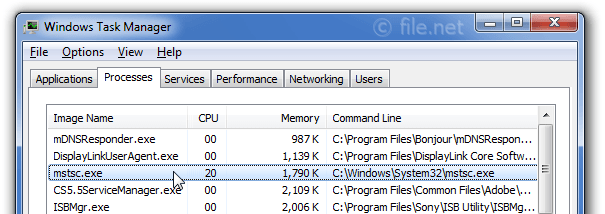
Description: Mstsc.exe is an important part of Windows, but often causes problems. The mstsc.exe file is located in the C:\Windows\System32 folder.
Known file sizes on Windows 10/11/7 are 677,888 bytes (28% of all occurrences), 1,068,544 bytes and 8 more variants.
The file is a Windows core system file. Mstsc.exe is a Microsoft signed file.
Therefore the technical security rating is 1% dangerous; but you should also compare this rating with the user reviews.
Important: Some malware disguises itself as mstsc.exe, particularly when not located in the C:\Windows\System32 folder. Therefore, you should check the mstsc.exe process on your PC to see if it is a threat. We recommend Security Task Manager for verifying your computer's security. This was one of the Top Download Picks of The Washington Post and PC World.
Score
User Comments
I am using another computer with the Remote Desktop connection all set up and running, I terminated the process and ptute, gone.. no more connection... This file is fine in that sence, but if you didn't have Remote Desktop Enabled and setup and seen this running then I would have that Red Flag waiving high, someone could be using your computer, ONLY if you didn't set this up to begin with... My oppinion. But most cases It would only allow one connection to the Remote Desktop's computer at a time that I believe, whenever another user would try to log on, then a msg would popup if ok to logon SuD (further information)
It's the Remote Desktop Client. You use it to connect to another computer's remote desktop. Thomas
I love that application - helps me with my research Magda
Client's computer has mstsc.exe setup to run at startup. Points to %USER%\Application Data\Microsoft\Windows. Obvious fake. If this file is found anywhere but %windows%\System32, it should be considered very dangerous. Pawel Tarnowski
I use mstsc on a daily basis at work to remotely work on computers. It is a core Microsoft application for remote connections. MSTSC - Microsoft Terminal Services Client. It is a useful tool when used properly. When you log into a remote computer with mstsc you must have a valid Username and Password for the computer that you are logging into, also it will log off anyone who is logged into that computer with a prompt. Therefore if you have your computer protected with password required accounts it should not be a concern that anyone can just log into your computer with mstsc. GentleBen_49 (further information)
it showed up on my desktop with a lightbulb icon the same day I was held hostage by Think Point. Ginger Parker
comodo (firewall) alerted that IS malicious! one of the kids' friends put on puter; the SAME person whom also spilled beer on the keyboard ... BEWARE! microsoft ended support on win 2000, so .. pretty much open on ur own risk sun in alabama (further information)
mstsc.exe provides access to terminal server’s functions using the commandline (dos prompt) Laila
It showed up on my desktop, with a filesize of 510KB. Trend Micro's HouseCall program flaged it as a trojan. I certainly don't remember downloading it. Jerramy
Essential for me to monitor systems on a SERVER FARM Joseph
I use ti every day to remotely access workstations & servers. I like it better than pcAnywhere. Simple but essential for work. Not essential for a home computer. Ed Lipchus
Summary: Average user rating of mstsc.exe:
based on 23 votes with 11 user comments.
10 users think mstsc.exe is essential for Windows or an installed application.
2 users think it's probably harmless.
4 users think it's neither essential nor dangerous.
5 users suspect danger.
2 users think mstsc.exe is dangerous and recommend removing it.
2 users don't grade mstsc.exe ("not sure about it").
Best practices for resolving mstsc issues
A clean and tidy computer is the key requirement for avoiding problems with mstsc. This means running a scan for malware, cleaning your hard drive using 1cleanmgr and 2sfc /scannow, 3uninstalling programs that you no longer need, checking for Autostart programs (using 4msconfig) and enabling Windows' 5Automatic Update. Always remember to perform periodic backups, or at least to set restore points.
Should you experience an actual problem, try to recall the last thing you did, or the last thing you installed before the problem appeared for the first time. Use the 6resmon command to identify the processes that are causing your problem. Even for serious problems, rather than reinstalling Windows, you are better off repairing of your installation or executing the 7DISM.exe /Online /Cleanup-image /Restorehealth command. This allows you to repair the operating system without losing data.
To get your computer running as fast as it did on day one, you can 8reset your PC. Your personal files will remain intact, but any programs you installed will need to be reinstalled.
To help you analyze the mstsc.exe process on your computer, the following programs have proven to be helpful: ASecurity Task Manager displays all running Windows tasks, including embedded hidden processes, such as keyboard and browser monitoring or Autostart entries. A unique security risk rating indicates the likelihood of the process being potential spyware, malware or a Trojan. A good Bantivirus software detects and removes sleeping spyware, adware, Trojans, keyloggers, malware and trackers from your hard drive.

Score
User Comments
SuD (further information)
Thomas
Magda
Pawel Tarnowski
GentleBen_49 (further information)
Ginger Parker
sun in alabama (further information)
Laila
Jerramy
Joseph
Ed Lipchus
Summary: Average user rating of mstsc.exe: based on 23 votes with 11 user comments. 10 users think mstsc.exe is essential for Windows or an installed application. 2 users think it's probably harmless. 4 users think it's neither essential nor dangerous. 5 users suspect danger. 2 users think mstsc.exe is dangerous and recommend removing it. 2 users don't grade mstsc.exe ("not sure about it").